

Logging in through the Big Swerte mobile login process is quick, whether you’re using the app or your mobile browser. At Big Swerte, all you need is your registered Username and password to get started.
If you ever run into an issue along the way, getting back on track usually takes just a few quick checks.
How to Complete Your Big Swerte Mobile Login
Mobile login follows the same secure login process used across the platform, just optimized for your phone. Whether you’re using the app or your mobile browser, here’s how it works:
Step 1: Open the App or Visit the Site
Launch the app, or open our website through your mobile browser.
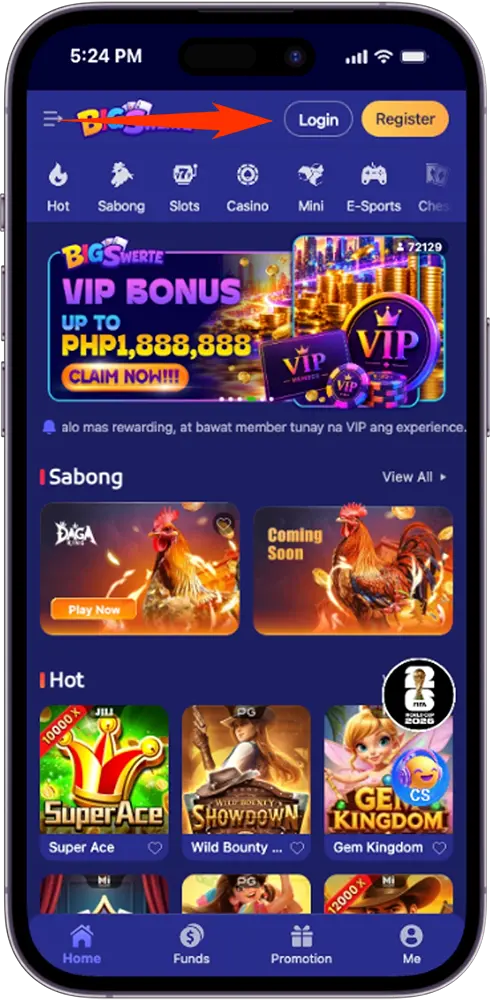
Step 2: Tap Login
Select the Login button, usually found at the top of the screen.
Step 3: Enter Your Username and Password
Fill in your registered Username and password in the fields provided.
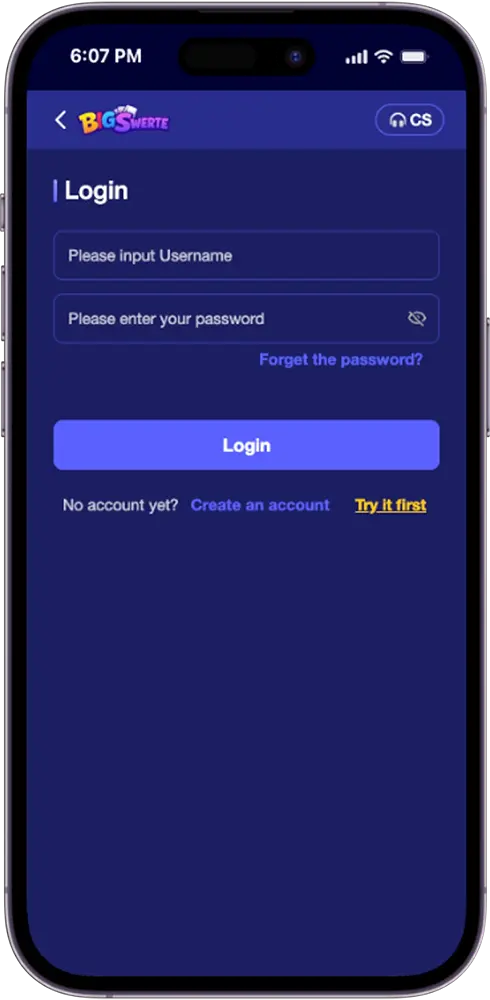
Step 4: Tap Login to Access Your Account
Once submitted, you’ll be taken straight to your dashboard.
If you’d rather explore the platform before logging in, the “Try it first” option on the login screen lets you preview the site without an account.
Fixing Common Mobile Login Issues
Most mobile login issues come down to one of the following. Here’s how to resolve each:
Outdated App Version
Check the Google Play Store or App Store for available updates. Login issues often trace back to running an older version of the app.
Insufficient Storage or OS Compatibility
Confirm your device has enough free storage and meets the app’s minimum OS requirements. Low storage can interfere with the login process.
Unstable Mobile Data or WiFi
Switch between mobile data and WiFi if one connection type is unreliable. A weak signal can cause the login request to fail or stall.
Cached App Data
Clear the app’s cache through your device settings. Stored data can occasionally conflict with a fresh login attempt.
Incorrect Username or Password
Double-check for typos, extra spaces, or Caps Lock. If you can’t recall your password, you’ll need to go through our password recovery process instead.
For login issues not specific to mobile, our general troubleshooting steps for the platform apply as well.
Getting Help Without Leaving the Login Screen
If you run into trouble before you’re even logged in, you don’t need to search for support elsewhere. The CS button, visible at the top of the login screen, connects you directly to our support team without requiring you to log in first.
Tap it to start a live chat right away, whether your issue is login-related or something else entirely.
Keeping Your Mobile Login Secure
A few habits go a long way in keeping your mobile login safe:
Enable Two-Factor Authentication (2FA)
2FA adds a second verification step beyond your password, making it much harder for anyone else to access your account.
Avoid Logging In on Public WiFi
Public networks are less secure. Use mobile data or a trusted WiFi connection when logging in, especially before making transactions.
Log Out on Shared Devices
Always log out after using your account on a shared or borrowed device.
Report a Lost or Stolen Device Immediately
If your phone is lost or stolen, contact our support team right away so we can help secure your account.
Tips for a Smoother Big Swerte Mobile Login Experience
Save your Username securely
Use a password manager to store your login details and avoid mistyping them each time.
Keep the app updated
Enable automatic updates so you’re always running the latest version.
Bookmark the official site
If logging in through your mobile browser, save the correct URL to avoid unofficial links.
Enable notifications
Turning on app notifications helps you stay informed of any account or security alerts right away.
Ready to Play, Wherever You Are!
Big Swerte mobile login takes just a few taps, whether you’re on the app or your browser. Keep your Username and password secure, and support is always one tap away if you need it.
Frequently Asked Questions (FAQs)
Can I log in to Big Swerte using my email instead of my username?
No. The login screen only accepts your registered Username and password.
Do I need to install the app to log in, or can I use my mobile browser instead?
Either works. You can log in through the app or directly through our website using your mobile browser, using the same Username and password.
Is app login more secure than browser login?
Both are equally secure, protected by SSL encryption. Enabling 2FA adds the same extra layer of protection regardless of which method you use.
What if I forgot my username instead of my password?
Contact our support team through the CS button on the login screen or through live chat, phone, or email. An agent can help verify your identity and retrieve your account details.
Can I be logged in on the app and mobile browser at the same time?
Yes. You can be logged in on both simultaneously without affecting your account or session on either platform.