

Your Big Swerte login is the gateway to everything the platform has to offer, from live casino tables to sports betting, all just one sign-in away. Whether you’re logging in for the first time or settling in for another session, we’ve made the process quick, secure, and straightforward.
At Big Swerte, keeping your account protected from the moment you sign in is something we take seriously.
Big Swerte Login: How to Access Your Account on Desktop
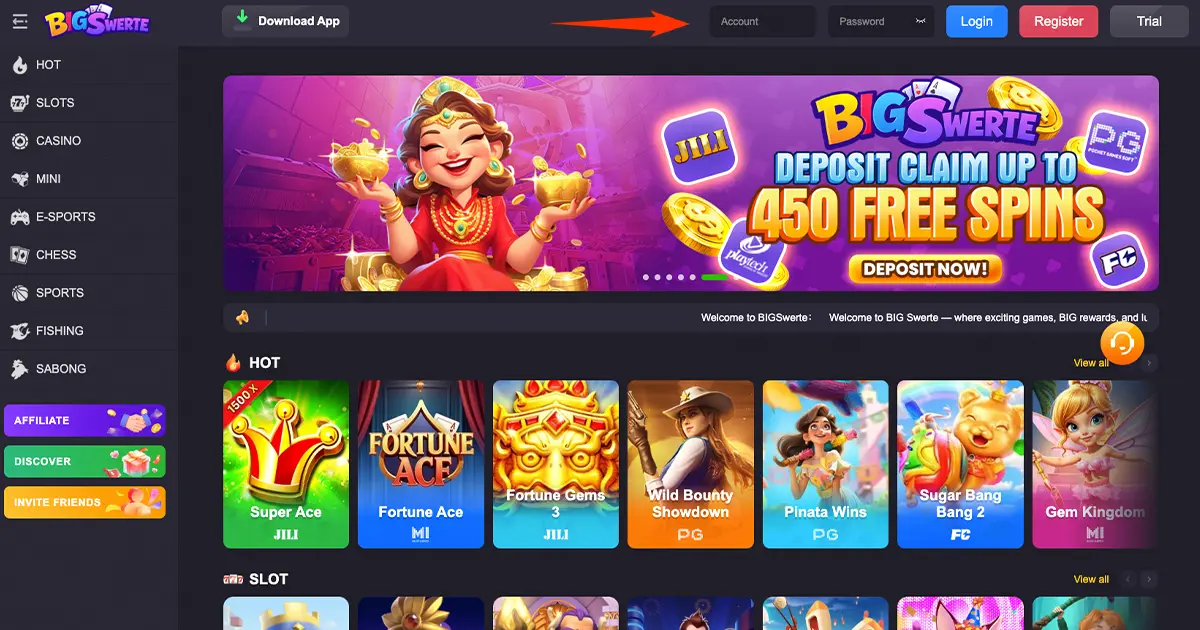
Your Big Swerte login on desktop is built right into the homepage — no separate page to navigate to. The Account and Password fields sit at the top of the site, so accessing your account takes just a few clicks:
Step 1: Visit the Official Website
Open the Big Swerte website on your desktop browser. The login fields are visible immediately, without needing to scroll or search for them.
Step 2: Enter Your Account and Password
Locate the Account and Password fields at the top of the page and fill them in. These are the same credentials you set up during registration, so there’s nothing new to remember.
Step 3: Click Login
Select the blue Login button beside the fields to access your account instantly. There’s no page reload or redirect involved; your dashboard loads right away.
For the smoothest experience, we recommend using an updated version of your preferred browser, whether that’s Chrome, Safari, or Edge. Older browser versions can occasionally affect how login fields display or respond.
If you’d rather explore the platform first, the Trial button next to Login lets you preview the site without creating an account, giving you a feel for the game library and layout before committing to registration.
Logging In via Mobile App
The Big Swerte login experience carries over seamlessly to mobile, using the same registered Username and password you’d use on desktop. Once the app is installed, logging in takes just a few taps from the main screen, no separate account setup required.
What makes mobile login especially convenient is that it puts your account in your pocket. Whether you’re checking a promo on the go, placing a quick bet during a commute, or logging in from a completely different device than usual, your credentials stay the same across every platform. There’s no need to re-register or create a separate mobile-only account; everything you’ve set up on desktop carries over automatically.
This also means your balance, game history, and active promotions stay perfectly in sync, no matter which device you last used. Log in on your phone during a commute, then pick up right where you left off on desktop later that evening, without missing a beat.
If you don’t have the app installed yet, the Download App button available directly on the website makes getting started quick and straightforward.
What You Can Do Once You’re Logged In
Once you’re past the login screen, your entire account is right there waiting. From your dashboard, you can:
- Access your full game library — slots, live casino, sports betting, sabong, and more, all instantly available without needing to log in separately for each category
- Manage your balance — deposit funds, withdraw winnings, and track your transaction history, giving you a clear view of your activity at any time
- Update your profile — keep your personal details and contact information current, which also helps ensure smooth communication if we ever need to reach you regarding your account
- Adjust your security settings — change your password or enable two-factor authentication whenever needed, putting account protection directly in your hands
- Track your promotions — view active bonuses, cashback offers, and ongoing campaigns tied to your account, so you never miss a reward you’ve already qualified for
Everything you need to manage your account and start playing is available the moment you log in, whether you’re on desktop or mobile. There’s no need to jump between different sections of the site to find these tools; they’re all accessible from a single, centralized dashboard.

Common Big Swerte Login Issues and Where to Get Help
Every now and then, logging in doesn’t go as smoothly as expected. Here’s a quick overview of what might be happening and where to turn:
A Technical Login Error
Sometimes the issue is technical — incorrect credentials, a cache conflict, or a connection hiccup. These are usually the quickest to resolve, often requiring nothing more than a double-check of your details or a cleared cache. Our troubleshooting guide walks through the most common causes and how to resolve them.
A Forgotten Password
If you can’t recall your password, self-service reset isn’t available. Instead, our support team can verify your identity and help restore access directly through live chat, a process built specifically to keep unauthorized users from gaining entry to your account.
A Locked Account
In some cases, your account may be restricted due to a security check, incomplete verification, or a self-exclusion setting. While it can feel alarming at first, a lock is typically a protective measure rather than a penalty. Our dedicated guide breaks down the different causes and what to expect for each.
A Mobile-Specific Issue
If you’re running into trouble specifically on the app, factors like an outdated app version or unstable mobile data can be behind it. Our mobile login guide covers device-specific fixes in more detail.
No matter the cause, our support team is available 24/7 through live chat, phone, or email if you need direct assistance. In most cases, a quick conversation with an agent is all it takes to get you back into your account.
Keeping Your Big Swerte Login Secure
A secure login starts with a few simple habits on your end, backed by protections we’ve built into the platform itself.
On our side, every login attempt is continuously monitored for unusual activity, such as access from an unrecognized device or location. If anything looks out of the ordinary, we take immediate steps to protect your account, which may include temporarily restricting access until your identity is confirmed. This kind of monitoring runs quietly in the background, so it never gets in the way of a normal login, but it’s there the moment something looks off.
On your end, a few habits go a long way:
- Enable two-factor authentication for an extra layer of protection beyond your password, so even if someone else obtains your credentials, they still can’t get in
- Use a strong, unique password, and avoid sharing it with anyone, including anyone claiming to represent our support team
- Log out on shared or public devices after each session, particularly important if you ever access your account from a borrowed phone or a public computer
- Update your password periodically, especially if you suspect any unusual activity on your account or on any other platform where you use similar credentials
Together, these safeguards help keep your account exactly where it belongs: in your hands only.
Big Swerte Login and Platform Compliance
Every login on our platform operates within the framework of our PAGCOR license, which means the systems protecting your account aren’t just good practice; they’re a regulatory requirement we take seriously.
This compliance extends beyond just holding a license. Our login and account security processes are built to align with data privacy standards under the Data Privacy Act of 2012, and with anti-money laundering obligations set by the Anti-Money Laundering Council. In practice, this means your personal information and account credentials are handled with the same level of scrutiny expected of any regulated financial platform in the Philippines, not just a gaming site.
For players, this translates into a straightforward benefit: logging in isn’t just about convenience, it’s backed by a system designed to meet legal and regulatory standards at every step, from the moment you enter your credentials to how your data is stored afterward.
Tips for a Seamless Big Swerte Login Every Time
A few habits can help make sure your login goes smoothly, every single time:
- Save your credentials in a password manager. This avoids typos and keeps you from relying on browser auto-fill, which can occasionally save outdated passwords.
- Bookmark the official website. This ensures you’re always landing on the legitimate login page rather than risking a mistyped URL or an unofficial link.
- Keep your browser or app updated. Outdated versions are one of the more common, and most overlooked, causes of login hiccups.
- Avoid logging in on unstable connections when possible. A weak signal can cause a login attempt to stall or fail, even with correct credentials.
- Know your account details are separate from your payment details. Your login credentials are used only to access your account, never to process deposits or withdrawals directly, which are handled through their own secure channels.
These habits take little effort but go a long way in keeping your login experience consistent and hassle-free.
Your Account, One Login Away!
However you choose to play, your Big Swerte login is designed to get you in quickly and keep you protected once you’re there. Whether it’s your first time signing in or your hundredth, the process stays simple, secure, and ready whenever you are.
Frequently Asked Questions (FAQs)
How do I log in to my account?
On desktop, enter your Account and Password directly at the top of the homepage and click Login. On mobile, open the app or website, enter your Username and password, then tap Login.
Can I use the same login details on both desktop and mobile?
Yes. Your Account or Username and password work across both platforms, so you can switch between desktop and mobile without needing separate credentials.
What should I do if I forgot my password?
We don’t offer a self-service password reset. Instead, reach out to our support team through live chat, and an agent will verify your identity and help restore access.
Why would my account get locked?
An account lock is usually tied to a security check, an incomplete verification step, a self-exclusion setting, or a policy violation. Most locks are resolved quickly once the cause is identified.
What should I do if I run into a login error?
Start by double-checking your credentials, clearing your cache, and confirming a stable internet connection. If the issue persists, our support team can help identify the cause.
Is my Big Swerte login secure?
Yes. Every login attempt is monitored for unusual activity, and we encourage all players to enable two-factor authentication for added protection.
Can I explore the platform without logging in first?
Yes. The Trial option on desktop and the “Try it first” option on mobile let you preview the platform before creating an account.
Do I need to download the app to log in?
No. You can log in directly through your desktop or mobile browser without installing the app, though the app is available if you prefer it.
What can I do once I’ve logged in?
You’ll have full access to your dashboard, including the game library, balance management, profile settings, and active promotions.
Who do I contact if I’m having trouble logging in?
Our support team is available 24/7 through live chat, phone, or email, and can assist with any login-related issue regardless of the cause.