
Cashing in through GCash is the quickest way to get your balance ready for play, and a Big Swerte GCash deposit takes just a few taps from start to finish. If you already have GCash set up on your phone, you’re only a few steps away from topping up your account and jumping into your next game.
At Big Swerte, we built our deposit process around the payment methods Filipino players already trust every day — and GCash tops that list. This guide walks through exactly what to expect, from the moment you select GCash in the cashier to the second your balance updates.
Why GCash Is the Fastest Way to Fund Your Account
Out of every payment method we support, GCash is the one most players reach for first — and once you’ve used it, it’s easy to see why. There’s no reference number to copy, no separate confirmation email to wait for, and no guessing whether your payment actually went through.
The moment you approve the transaction on your GCash side, your Big Swerte balance updates almost instantly. You’re redirected straight from our cashier to your GCash app, you confirm with your MPIN, and you’re brought right back to the platform ready to play. There’s no manual step in between where something could go wrong or get delayed.
For most Filipino players, GCash is already part of daily life — used for bills, transfers, and everyday purchases — so funding your gaming account works the same familiar way. The platform simply plugs into that existing habit instead of asking you to learn something new.
What You Need Before Your Big Swerte GCash Deposit
A little preparation makes the whole process go through without a hitch. Before you start, make sure the following are in place:
A verified GCash account
Your GCash account should be fully verified under your real name. Unverified or limited accounts sometimes run into sending restrictions, especially once you go beyond smaller amounts.
Matching account details
The name registered on your Big Swerte account needs to match the name on your GCash account. This is one of the most common reasons a deposit gets flagged or delayed, so it’s worth double-checking before you start.
Sufficient GCash balance
Make sure your GCash wallet has enough funds to cover your intended deposit, plus the ₱100 minimum we require to process it.
An active mobile number linked to GCash
Your GCash account should be linked to a working mobile number, since you’ll need it to receive the one-time PIN or confirm the transaction through the app.
A stable connection
GCash deposits move fast, but a dropped connection mid-transaction can still cause errors. A stable data or Wi-Fi connection keeps things moving smoothly from your cashier to your GCash app and back.
How to Make a Big Swerte GCash Deposit: Step-by-Step
Here’s exactly what happens on screen, from opening the app to your balance updating:
Step 1: Open the Deposit Page
You can get here two ways — tap the green Deposit button on the homepage, or head to your account dashboard and tap Deposit right next to Withdrawal on your profile page. Either one brings you to the same screen.
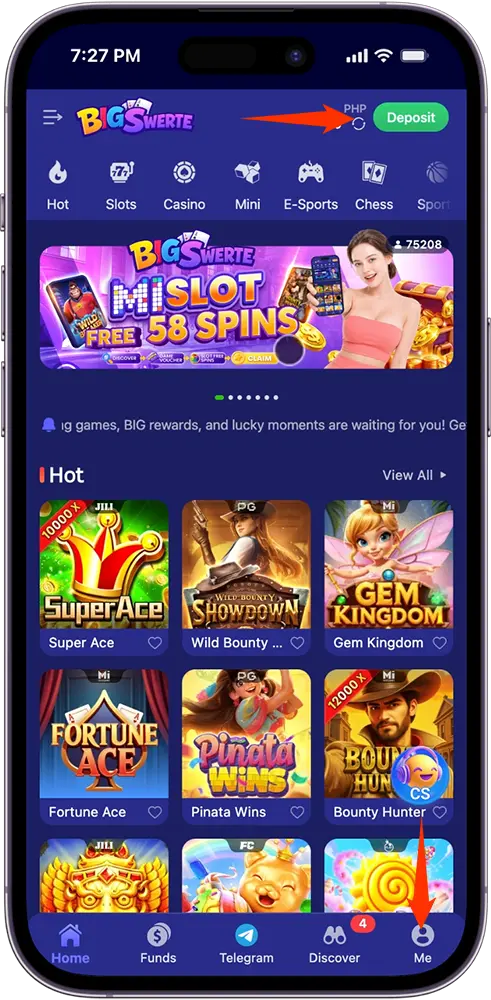
Step 2: Select GCash and Your Channel
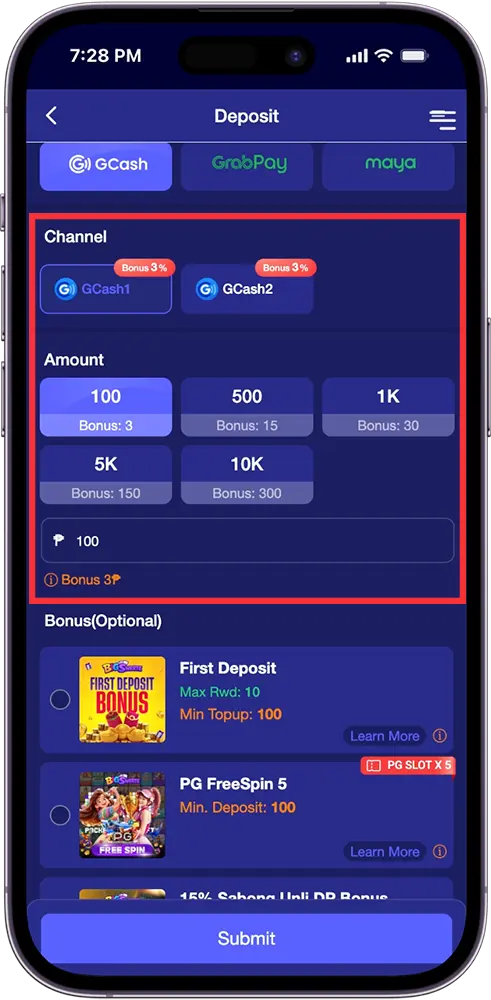
On the Deposit page, tap the GCash tab (you’ll also see GrabPay and Maya as options). Underneath, choose between GCash1 or GCash2 as your channel — both currently carry the same bonus rate, so either works.
Step 3: Choose Your Amount
Tap one of the preset amounts — ₱100, ₱500, ₱1K, ₱5K, or ₱10K — each showing the bonus points that come with it, or enter a custom amount in the field provided. Our required minimum for GCash deposit is ₱100.
Step 4: Apply a Bonus (Optional)
If there’s an active promotion you want to use — like a First Deposit Bonus, a PG FreeSpin voucher, or a category-specific bonus — select it here before moving on. This step is optional, and you can skip straight to submitting if you’d rather deposit without one.
Step 5: Tap Submit
Once your amount and any bonus selection are set, tap Submit to proceed.
Step 6: Complete the Payment Through GCash
You’ll be redirected to a secure GCash payment page with two ways to finish:
- Tap “Open in GCash” to jump straight into your GCash app, then confirm using your fingerprint, face ID, or MPIN, and follow the on-screen prompts to complete the transaction.
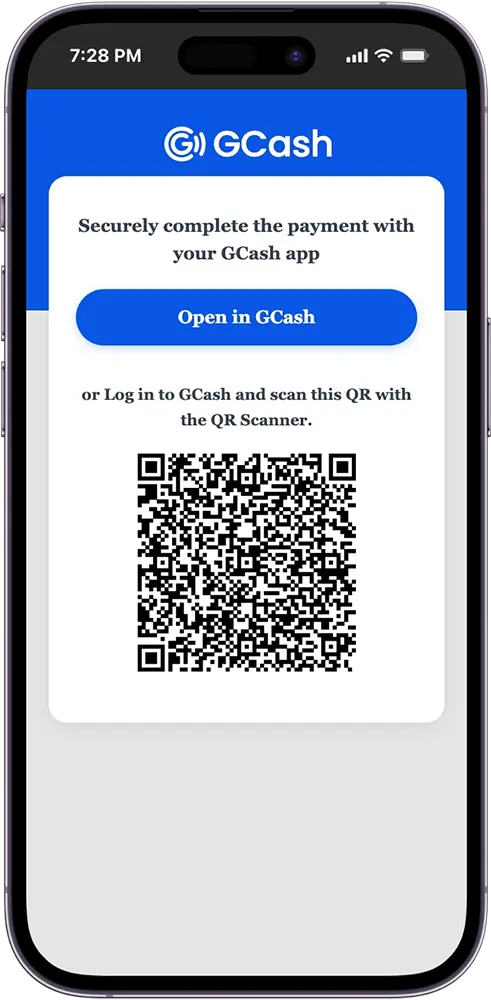
- Prefer to scan instead? Log in to GCash on your phone and scan the QR code shown on the payment page using GCash’s built-in scanner — handy if you’re depositing from a PC or a different device than the one your GCash app is on.
Step 7: Your Balance Updates Instantly
Once you’ve confirmed the payment on the GCash side, you’re brought right back to Big Swerte and your balance reflects the deposit almost immediately — no waiting, no manual refresh needed.
Big Swerte GCash Deposit Minimum and Limits
Deposits can start as low as ₱100 — an easy amount to work with whether you’re topping up for the first time or just adding a small amount before your next game.
On the higher end, the Deposit page lets you enter a custom amount up to ₱50,000 per transaction through the amount field. If you’re looking to fund your account with more than that in one go, simply repeat the deposit process — there’s no limit on how many times you can cash in within a day.
Keep in mind that your GCash account itself may carry its own sending limits depending on your verification tier, separate from anything on our end. If you’re a heavy depositor, it’s worth checking your GCash app’s account limits to make sure your wallet can support the amount you’re trying to send.
Processing Time: What to Expect
A Big Swerte GCash deposit is processed instantly — from the moment you confirm the payment on the GCash side, your balance typically updates within seconds of returning to the platform.
There’s no waiting period, no manual review, and no need to submit proof of payment. Once GCash confirms the transaction on their end, our system picks it up automatically and credits your account right away, along with any bonus you selected during the deposit process.
If your balance doesn’t reflect the deposit within a few minutes, it’s usually a sign the transaction didn’t fully go through on the GCash side rather than a delay on ours — worth checking your GCash transaction history first before reaching out to support.
Common GCash Deposit Issues (and How to Fix Them)
Most deposits go through without a hitch, but a few issues do come up from time to time. Here’s what to check if something doesn’t go as expected:
Transaction declined or failed
This usually means your GCash balance is insufficient to cover the deposit amount, or your account has hit a sending limit tied to your verification tier. Check your GCash balance and account status before trying again.
Deposit submitted, but balance not updating
If you tapped Submit but your Big Swerte balance hasn’t changed, it likely means the GCash side of the transaction wasn’t fully completed — either the MPIN or biometric confirmation wasn’t finished, or the app was closed before the process ended. Check your GCash transaction history first; if the payment shows as successful there but your balance still hasn’t updated after a few minutes, that’s when it’s worth reaching out to support.
Redirected to GCash but nothing happens
If tapping “Open in GCash” doesn’t launch the app, try the QR code option instead — log in to GCash separately and scan the code shown on the payment page using the app’s built-in scanner.
Deposit delayed due to a name mismatch
If the name on your account doesn’t match your registered GCash name, your deposit may get flagged for review instead of processing instantly. Double-checking that these match beforehand avoids this entirely.
Stuck on the GCash payment page
A weak or dropped connection mid-transaction can cause the page to hang after confirming payment. If this happens, avoid refreshing or resubmitting right away — check your GCash app first to confirm whether the payment actually went through before attempting the deposit again.
Tips for a Seamless GCash Deposit
A few small habits go a long way in keeping your deposits quick and hassle-free every time:
- Keep your GCash app updated. Older versions can occasionally cause issues with the redirect or QR scanning process.
- Have your MPIN ready, or make sure biometrics are enabled. This keeps the confirmation step fast instead of fumbling for a forgotten PIN mid-transaction.
- Check your GCash balance before you start. Confirming you have enough funds upfront avoids a declined transaction partway through.
- Use the QR option if you’re on a PC. If you’re depositing from a desktop or a device without your GCash app installed, scanning the QR code from your phone is the more reliable route.
- Stick to one channel per session. If GCash1 doesn’t seem to be processing, try GCash2 rather than resubmitting the same channel repeatedly.

Your Balance Is One Tap Away
Funding your account through GCash is built to be quick, familiar, and free of unnecessary steps — from selecting your amount to confirming on your GCash app, the entire Big Swerte GCash deposit process takes just a few minutes from start to finish.
Whether you’re cashing in for the first time or topping up before your next game, everything you need is already in the app you use every day. Open GCash, confirm your payment, and your balance is ready the moment you’re back on the platform.
Frequently Asked Questions (FAQs)
Is there a fee for depositing via GCash on Big Swerte?
No, we don’t charge any fee for GCash deposits. The full amount you send is what gets credited to your balance, plus any bonus you selected.
Can I use someone else’s GCash account to deposit?
No. Your deposit must come from a GCash account registered under your own name. Using another person’s account can cause your deposit to be delayed or flagged for review.
What happens to my bonus if I don’t select one during deposit?
Your deposit still goes through normally — you’ll simply receive the amount you deposited without any added bonus. You can choose to apply a bonus on your next deposit instead.
Can I deposit through GCash if I only have a browser and no app installed?
Yes. Instead of tapping “Open in GCash,” log in to GCash on your phone and scan the QR code shown on the payment page using the app’s built-in scanner.
What should I do if my GCash deposit doesn’t reflect after 30 minutes?
First, check your GCash transaction history to confirm the payment actually went through. If it shows as successful there but your Big Swerte balance still hasn’t updated, reach out to our support team with your transaction reference for assistance.